
Boring Sony Marker Labeler
Boring Sony Marker Labeler: your Sony shot marks, in the edit
A small Mac app for editors and shooters on Sony FX cameras. It reads the shot marks from each clip's sidecar file and writes them into a copy of the clip, so they land as clip markers in Premiere Pro. $20, once.
- Marks tapped on set show up in the edit.
- Drop in clips and sidecar files in any order. It pairs them.
- Your camera originals stay as they are.
Price
$20
One time. Runs on your Mac. Nothing gets uploaded.
Buy for $20 →Tested end to end on FX3 footage. Sending someone the link? Use the short buy page.
Why do editors still scrub every take?
Someone on set already marked the good moments. Here is where those marks get lost, and what the app does about each.
-
Shot marks die on the card.
You tap a mark the moment something good happens. The camera saves it in a small file next to the clip, and editing software ignores that file.
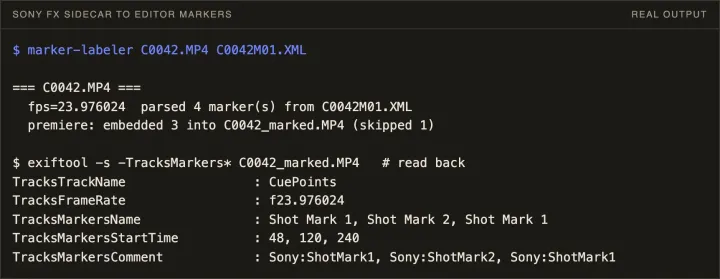
How the labeler handles itThe app reads that file (the M01.XML sidecar) and writes the marks into the clip, where Premiere reads them on import.
-
Scrubbing a whole take to find one moment.
The editor starts at 00:00 of every clip and hunts for what someone already flagged.
How the labeler handles itImport the marked copy and the markers are sitting on the Source Monitor. Jump straight to them.
-
Touching camera originals.
Nobody wants a tool rewriting the only copy of the footage.
How the labeler handles itIt writes a new file next to the source, named CLIP_marked.MP4. The original is never changed.
-
Matching sidecars to clips by hand.
A card holds dozens of clips and dozens of XML files.
How the labeler handles itDrop a mix of MP4 and XML files on the app, in any order. It pairs each clip with its own sidecar.
-
Another install, another account.
Plenty of tools want a login, a plugin and a monthly fee.
How the labeler handles itThere's no account and no subscription, and it makes no network calls. It runs on your Mac with what macOS already has.
Why is it worth $20?
The marks were already made, on set, by the person who saw the moment. This keeps that work from being thrown away.
We built it inside a working production company. Our own editors were scrubbing takes our cameras had already marked.
What do you need?
- A Mac. Python and Perl come with macOS, and the app brings its own copy of ExifTool.
- Footage from a Sony FX camera that writes shot marks to an M01.XML file next to each clip.
- Premiere Pro, with two settings on under Settings, then Media: Write clip markers to XMP, and Enable Clip and XMP Metadata Linking.
Markers come in white, because Premiere ignores marker color from the file. Recolor them in Premiere if you like. DaVinci Resolve support is in beta, and there's no Windows version yet.
Questions editors ask
How do I get Sony shot marks into Premiere Pro?
Premiere doesn't read the marks in Sony's sidecar file. Drop the clip and its M01.XML onto Boring Sony Marker Labeler, then import the _marked copy it makes. The marks show up as clip markers.
Where does a Sony FX3 save shot marks?
In a metadata file next to each clip, named like the clip with M01.XML on the end. That's the file this app reads.
Why don't my Sony markers show up in Premiere?
Usually two Premiere settings are off. Under Settings, then Media, turn on Write clip markers to XMP and Enable Clip and XMP Metadata Linking. Restart Premiere and import the marked file again.
Does it work with DaVinci Resolve?
There's a Resolve mode in beta. It adds markers to a clip that's already in your Resolve media pool. Premiere Pro is the path we've tested end to end.
Which Sony cameras does it work with?
Sony FX bodies that write shot marks to the card's metadata file. We've tested it end to end on FX3 footage.
Does it change my original footage?
No. It writes a marked copy next to the source and leaves the original file alone.